About the framework
Description
Data Acquisition Framework is a Python framework for running EEG-based experiments. It’s made up of several components (sequencers that responsible for the logic of what screens are shown to the participant, event managers responsible for reacting to events such as key presses or passage of time, classes responsible for managing EEG headsets, etc.) that can be composed together to design an experiment.
The framework is designed to be flexible and extensible. It provides a set of base classes that can be used to create custom components, as well as a set of pre-built components that can be used out of the box.
Installation
To use the framework, install it through pip from GitLab.
Using HTTPS:
pip install git+https://gitlab.com/kn-neuron/neuroguard/data-acquisition-framework.git
Using SSH:
pip install git+ssh://git@gitlab.com/kn-neuron/neuroguard/data-acquisition-framework.git
You can also install a specific version, for example:
pip install git+https://gitlab.com/kn-neuron/neuroguard/data-acquisition-framework.git@v1.0.0
Then you can import the framework in your code, for example:
from data_acquisition.event_manager import FixedTimeoutEventManager
from data_acquisition.experiment_runner import ExperimentRunner
from data_acquisition.gui import PygameGui
from data_acquisition.sequencers import TextScreenSequencer
Architecture
The main components of the framework are:
event: A class representing an event that can happen on the screens, used by event managers.
event manager: A class responsible for managing the events happening on the screens and grouping them, used by the sequencer.
screen: A class representing a single type of screen, rendered by GUI.
eventful screen: A wrapper for a screen with an event manager, returned by a sequencer.
screen sequencer: A class responsible for the logic of the screen sequence.
GUI: A class responsible for the user interface of the application.
experiment runner: A class responsible for running the experiment.
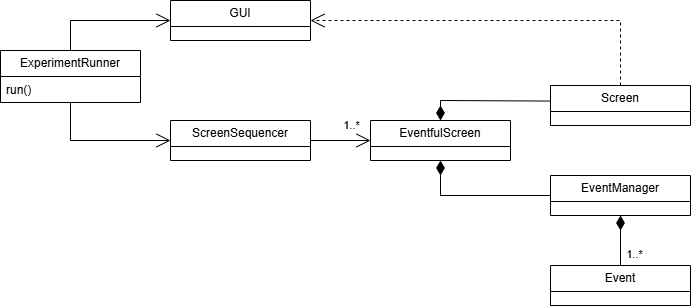
How to use the framework
Basic usage:
Create a GUI object.
Create a sequencer object.
Pass the GUI object and the sequencer object to the experiment runner.
Call the run method of the experiment runner to start the experiment.
Note
GUI may need to be started in a separate thread, depending on the GUI library used.
You can use the classes provided in the framework or create your own. See the docs for the specific classes for how to implement them.
Example:
from pathlib import Path
from threading import Thread

from data_acquisition.eeg_headset import MockEEGHeadset
from data_acquisition.event_manager import FixedTimeoutEventManager
from data_acquisition.experiment_runner import ExperimentRunner
from data_acquisition.gui import PygameGui
from data_acquisition.gui.display_mode import WindowedDisplayMode
from data_acquisition.sequencers import TextScreenSequencer


def finalize_acquisition(gui: PygameGui, headset: MockEEGHeadset) -> None:
   gui.stop()
   headset.stop_and_save_at_path(Path("data_raw.fif"))


if __name__ == "__main__":
   headset = MockEEGHeadset()

   gui = PygameGui(
      window_title="Test", display_mode=WindowedDisplayMode(height=600, width=800)
   )

   event_manager = FixedTimeoutEventManager(gui=gui, timeout_millis=1000)
   sequencer = TextScreenSequencer(
      gui=gui,
      event_manager=event_manager,
      texts=["a", "b", "c"],
      screen_show_callback=lambda text: headset.annotate(text),
   )

   runner = ExperimentRunner(
      gui=gui,
      screen_sequencer=sequencer,
      end_callback=lambda: finalize_acquisition(gui, headset),
   )

   headset.start()
   Thread(target=runner.run).start()
   gui.start()